How to View and Download Your Graduation Photos
Your graduation photos are available directly through your Tassel graduate account! Once your photos are ready, you can view your gallery, browse your pictures, and download them to your device.
Follow the steps below to access your graduation memories.
Access Your Graduation Photos
- Log in to your Tassel graduate account.
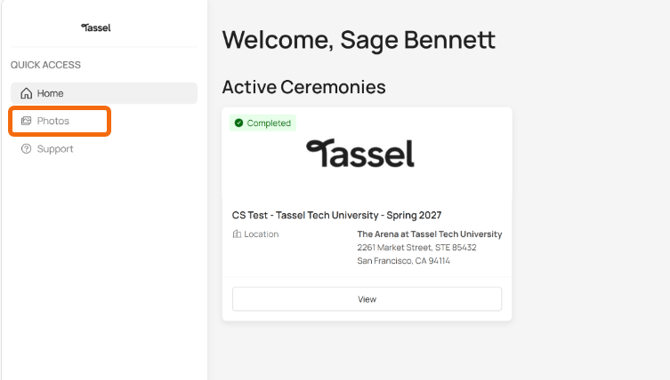
- From the left-hand menu, click Photos.
- Your graduation photo gallery will appear, displaying the photos matched to you.
View Your Graduation Photos
- Click on any photo thumbnail to open a larger preview.
- Use the arrow buttons to browse through your available photos.
- When you're finished viewing, click the X in the upper-right corner to return to your gallery.
Download Your Graduation Photos
- From your photo gallery, locate the Download All button in the upper-right corner.
- Click Download All to save all available graduation photos to your device.
- A confirmation message will appear once your photos have downloaded successfully.

You're All Set!
Your graduation photos are now downloaded and ready for you to enjoy, save, and share with family and friends.
Congratulations on your graduation!
 Still have questions? If this article didn't answer your question, contact our Support Team for further assistance. We're happy to help!
Related Articles
How to Add Your Selfie During Graduation Registration
[Click here for an interactive tutorial] During graduation registration, you may be asked to submit a selfie to help match you with your graduation photos after the ceremony. You can take a new selfie using your device's camera or upload an existing ...Report Incorrect Graduation Information
If you notice incorrect information in your graduation registration, what you can do depends on whether the registration deadline has passed. If the Registration Deadline Has Not Passed If the registration period is still open, you can log in to your ...Find Your Graduation Registration Deadline
Your graduation registration deadline depends on your academic institution and graduation ceremony. Where Can I Find My Registration Deadline? The graduation registration deadline is usually included in the first email sent by your school when the ...Confirm That Your Graduation Registration Was Submitted
There are a few ways to confirm that your graduation registration was successfully submitted: 1. Confirm Your Registration on the Final Step After you have completed all the required information on the registration form, proceed to the final step: ...Complete Your Graduation Registration: Step-by-Step
Before You Begin: Make sure you have received an email from your school with instructions for accessing your graduation registration. The email will include the information you need to get started. Haven't Received an Email? Check your spam or junk ...