Update Your Registration Responses After Submitting
You may edit your registration responses as long as the registration deadline has not passed.
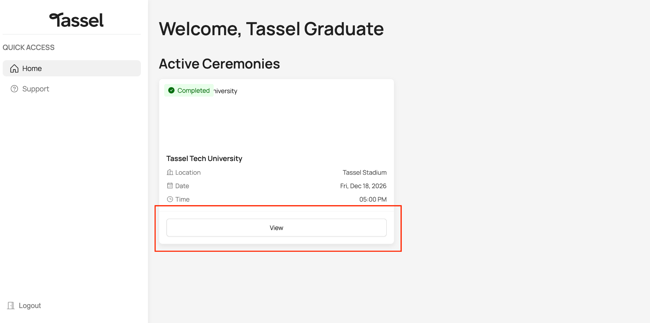
- Log in to your account.
- Under Active Ceremonies, click “View”.
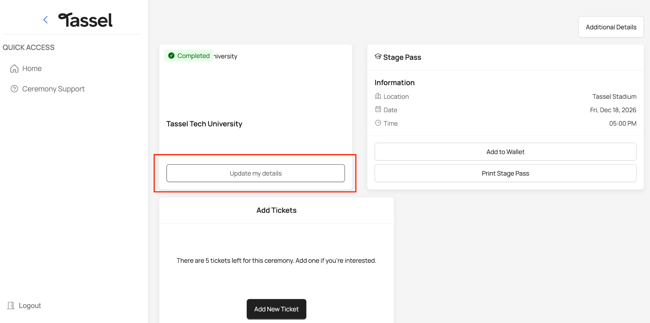
- On the next page, click “Update my details”.
- You’ll be taken through the registration form again. Update any details you need to change.
- Make sure you complete the form all the way to the end and click “Confirm” on the final page.
After the Registration Deadline
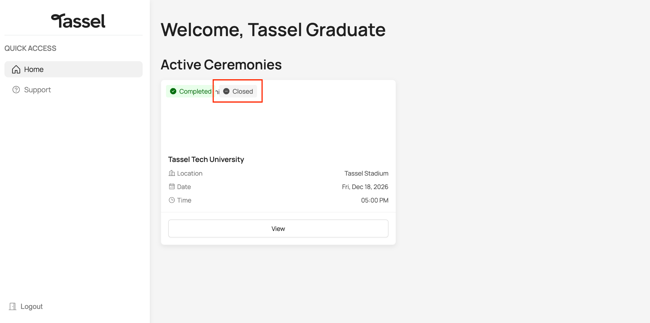
Once the registration deadline has passed, you will no longer be able to edit or update your registration details.
Under Active Ceremonies, you should see a Closed sign indicating that registration updates are no longer available.
Note: If you need to change any significant information after the deadline has passed, please contact your school for assistance.
 Still have questions? If this article didn't answer your question, contact our Support Team for further assistance. We're happy to help!
Related Articles
Complete Your Graduation Registration: Step-by-Step
Before You Begin: Make sure you have received an email from your school with instructions for accessing your graduation registration. The email will include the information you need to get started. Haven't Received an Email? Check your spam or junk ...How to Add Your Selfie During Graduation Registration
[Click here for an interactive tutorial] During graduation registration, you may be asked to submit a selfie to help match you with your graduation photos after the ceremony. You can take a new selfie using your device's camera or upload an existing ...Find Your Graduation Registration Deadline
Your graduation registration deadline depends on your academic institution and graduation ceremony. Where Can I Find My Registration Deadline? The graduation registration deadline is usually included in the first email sent by your school when the ...Who Sends My Registration Email and When?
When will I receive my registration email? Your institution determines the registration opening date and the timing of registration communications. Tassel sends registration emails based on the schedule established by your institution. This means you ...Confirm That Your Graduation Registration Was Submitted
There are a few ways to confirm that your graduation registration was successfully submitted: 1. Confirm Your Registration on the Final Step After you have completed all the required information on the registration form, proceed to the final step: ...